
Hubbub automatically creates a default set (also called a pattern) of Action Buttons that you can customize. However, you may want to create additional sets for different use cases—such as placing a unique set near your recipe card, header, or within the content of your post.
This guide will walk you through creating a reusable custom set of Action Buttons.
Create a New Action Button Pattern #
- In your WordPress dashboard, go to Hubbub → Action Buttons
- Click the “View All Patterns” button
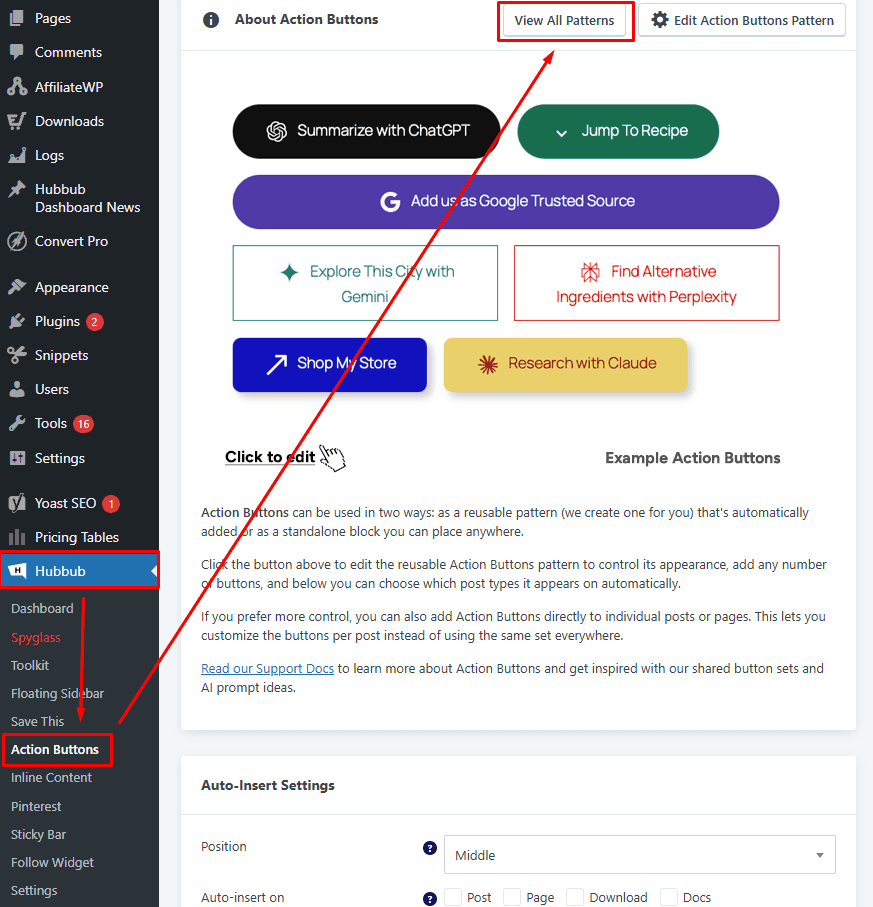
- Click “Add Pattern” to create a new set
- In the editor, add the Hubbub Action Buttons block
- The quickest way is to type: /action and select the block
- Add and customize the buttons you want included in this set
- Click Save
Add Your Custom Action Buttons to Your Site #
Once your pattern is created, you can place it anywhere on your site using one of the following methods:
Option 1: Using the Block Editor #
- Open any post or page
- Add your saved Action Button pattern using the block inserter
- Select your custom pattern from the list
Option 2: Using a Shortcode #
The second option is to insert the Action Buttons via a shortcode.
Lastly, you can insert a reusable Action Buttons pattern anywhere using a shortcode.
For full instructions, see: 👉 Action Buttons Shortcode