
Hubbub Pro 2.29.0 is full of great updates that we hope you all find useful in helping your websites grow (and have a little bit of fun along the way!).
Pro tier updates
New Share Buttons!
All Share Button
You can now add a single button to show all share networks that Hubbub currently supports so that your reader can choose which to platform they prefer to share to. Try it out right here or on the left-hand side Floating Sidebar.
We hope having this button makes it a bit easier for you to choose which networks to feature in Hubbub’s tools, while still giving your readers the ability to share anywhere.
In addition to the All Share Button, we’ve added three new ways for readers to share.
Nextdoor Share Button
We added a dedicated share button for Nextdoor, which is especially handy if your content gets shared in local communities or neighborhood groups.
Copy Link Button
There’s also a simple Copy Link button now that copies the current page URL to the clipboard, making it easy for readers to text, email, or drop your link into a chat.
Device Share Options Button
We’re also integrating with your reader’s device’s native share options with the Device Share button. It works on mobile and desktop across operating systems, so readers can use the sharing flow they already know.
Custom Pinterest Image Hover Button
Customize the background color of the Pinterest Image Hover Button or set it to a custom image of your own.
This is useful if you want stronger contrast on images, a more cohesive look, or a hover style that feels more “you.”

Pro+ Tier Updates
Action Buttons were introduced in the previous release of Hubbub Pro and they’ve been a big hit! We’ve been amazed at all of the inspiring ways you’ve used Action Buttons. So we’ve made them even better.
Action Button click stats
Would you like to know how your Action Buttons are performing? Which buttons are being used, on which posts? With stats for Action Button clicks you can know how these buttons are being used across your entire website. Giving you insights into which Action Buttons are being used and which aren’t.
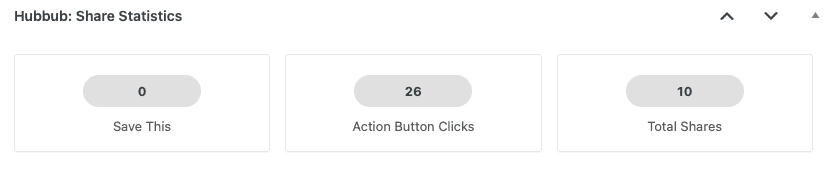
You can find these stats on each individual post as well as on your Hubbub dashboard.
Optionally, you can send these stats to Google Analytics’ event tracking so that you can build reports that will give you even deeper insight. Which specific buttons are working?
❓Need help with GA4?
We recommend chatting with our friend and NerdPress Recommended Expert Sabrina Tatalias – The Measurement Maven – about how to gain insights from tracking these click events.
Action Button Share button type
Hubbub Pro 2.29.0 adds an additional Action Button type called “share” that has two main options; show all share networks and show device share options. Adding this Action Button anywhere on your website will allow users to quickly share your content in just about any way they’d like. Try them both right here!
Kit Creator Network Recommendations
Save This adds a new optional feature to turn on Kit’s Creator Network Recommendations for Save This form submissions. This feature from Kit helps to create a network effect across Kit users that helps everyone grow their mailing lists.
Redirect on Success
Save This also adds a “Redirect on Success” feature that allows you to redirect Save This users to a page on your website or any external URL of your choice.
This can be useful to help promote downloadable materials, forward them to a checkout experience, or just to say “thank you” for signing up or using Save This.
As always, we’ve added new filters and actions behind-the-scenes to make our features pluggable and useful to developers. As always, see our Support Docs for more detailed information.
We think this is a great release of Hubbub and we’re excited about future releases coming soon. Keep your plugin up-to-date via your WordPress Admin.
As always, take good care!
The Hubbub Team